

Samsung Washer Repair in Pacifica, CA
Pacifica's exposure to winter storms, salt air, and wind-driven rain off the Pacific accelerates wear on washers and creates power surge risk during storm season—conditions that can damage electronics and shorten appliance life. When your Samsung washer needs repair, Pacifica Appliance Experts connects you with independent local technicians in areas like Linda Mar, Rockaway Beach, and Sharp Park who understand these regional pressures on your equipment. Getting a repair scheduled quickly means less disruption to your household and better protection against further damage from moisture and electrical stress.

Samsung Washer Repair for Pacifica Homeowners
Pacifica's coastal position subjects homes to persistent salt air, winter storms, and wind-driven rain that accelerate corrosion and electrical stress on appliances. Samsung washers, like all major laundry equipment, face heightened wear from power surges during storm season and the cumulative effects of moisture-laden air on metal components and circuitry. When a Samsung washer begins to malfunction—whether it's a drainage issue, drum problem, or control board failure—the combination of Pacifica's climate and the appliance's complexity makes prompt, skilled repair essential to prevent further damage and restore reliable operation.
Pacifica Appliance Experts connects homeowners in neighborhoods like Linda Mar, Rockaway Beach, and throughout the area with independent local repair providers who specialize in Samsung washers. These technicians arrive with the diagnostic tools and parts knowledge needed to pinpoint the root cause, whether it stems from salt-air corrosion, electrical damage, or mechanical wear. Rather than guessing at fixes, they perform a thorough assessment, explain what they find, and handle the repair with care for your appliance and your home. When your Samsung washer needs help, a fast local connection gets you back to normal laundry routines without the delay or frustration of waiting for distant service.
Common Samsung Washer Error Codes
Write the exact code down before anything else — Samsung reuses similar codes across models, and the precise characters are what narrow it down. Seven of the twelve below are usually a quick check you can make yourself; the other five need a technician.
Samsung Washer 4C
Often clearable without a technician
What it means: The washer asked for water and did not get what it expected, so it has stopped rather than run a cycle dry. Samsung shows this as 4C on newer panels, 4E on older ones and nF on some models — one fault, three displays.
Why it happens: Almost always something before the machine rather than inside it: a supply tap not fully open, a kinked fill hose behind the unit, or the small mesh screens where the hoses meet the washer silted up with scale and grit.
What you can check: Check both taps are fully open, then pull the machine out far enough to see the fill hoses are not kinked. If that looks fine, turn the taps off, unscrew the hoses at the machine end and look at the inlet screens for debris.
When to call someone: If the supply is good and the screens are clear, the inlet valve on the machine is next, and that is where it stops being an owner check.
Samsung Washer Ub
Often clearable without a technician
What it means: The load has gone off balance in the tub and the washer will not spin it at speed, because an unbalanced drum at spin speed can damage the machine.
Why it happens: Usually one heavy item on its own — a towel, a bath mat, a single pair of jeans — or a load that has twisted into a rope on one side of the drum.
What you can check: Open the door, redistribute the load by hand and restart the spin. Adding a couple of similar-weight items often settles it; washing one heavy item alone rarely spins well.
When to call someone: If it trips on every load including well-balanced ones, the suspension or the sensor reading the drum may need looking at.
Samsung Washer 4E
Often clearable without a technician
What it means: The same not-filling fault as 4C, shown as 4E on older Samsung panels.
Why it happens: A closed or partly closed tap, a kinked fill hose, or blocked inlet screens where the hoses connect.
What you can check: Work from the wall in: taps fully open, hoses unkinked, then the inlet screens at the machine end.
When to call someone: If water reaches the machine freely and it still will not fill, the inlet valve needs testing.
Samsung Washer SE
Often clearable without a technician
What it means: Water is not leaving the machine at the rate the cycle expects, or is not leaving at all. Shown as 5E, SE, 5C or nd depending on the panel.
Why it happens: The debris filter at the bottom front catches coins, hair grips and lint and eventually packs solid. A kinked drain hose or a standpipe that cannot take the flow does the same thing from further down the line.
What you can check: Open the small flap at the bottom front, drain the residual water into a tray and clean the filter. Then check the drain hose behind the machine for kinks and that it is not pushed too far into the standpipe.
When to call someone: If the filter is clean and the hose run is clear, the drain pump itself needs testing.
Samsung Washer UE
Often clearable without a technician
What it means: The same unbalanced-load condition as Ub, shown as UE on some Samsung models.
Why it happens: A single heavy item, or a load that has bunched to one side of the drum.
What you can check: Redistribute the load by hand and restart the spin.
When to call someone: If balanced loads also trip it, the drum suspension is worth checking.
Samsung Washer dC
Often clearable without a technician
What it means: The washer cannot confirm the door is shut and locked, so it will not start or will stop mid-cycle.
Why it happens: Most often laundry caught in the door seal stopping it closing flush, or a door that has been slammed rather than pushed shut.
What you can check: Open the door fully, clear anything caught around the seal, and close it firmly without forcing it. Check the latch and the strike plate for anything obstructing them.
When to call someone: If nothing is obstructing it and the lock still will not engage, the door lock assembly is the usual cause.
Samsung Washer SUd
Often clearable without a technician
What it means: The washer has detected far more foam than the drum is designed to handle, and is pausing to clear it before continuing.
Why it happens: Usually too much detergent, or a standard detergent used in a high-efficiency machine, which foams several times more than an HE formula.
What you can check: Let the machine run its own suds-clearing routine rather than cutting the cycle short. Next load, reduce the dose and check the detergent is HE-rated if your machine needs one.
When to call someone: If it appears with a correct HE dose, something may be holding water in the drum and it is worth having checked.
Samsung Washer 5C
Often clearable without a technician
What it means: The same not-draining fault as 5E and SE, shown as 5C on some Samsung panels.
Why it happens: A packed debris filter at the bottom front, a kinked drain hose, or a standpipe that cannot take the flow.
What you can check: Clean the filter behind the flap at the bottom front, draining the residual water into a tray first, then check the hose run behind the machine.
When to call someone: If the filter is clean and the hose is clear, the drain pump needs testing.
Samsung Washer nF
Often clearable without a technician
What it means: The washer is not filling — the same fault Samsung shows as 4C and 4E on other panels.
Why it happens: A tap that is not fully open, a kinked fill hose, or the inlet screens where the hoses meet the machine blocked with scale and grit.
What you can check: Check both taps, straighten the hoses, then turn the taps off and inspect the inlet screens at the machine end.
When to call someone: If water reaches the machine freely and it still will not fill, the inlet valve is next.
Samsung Washer OE
Usually needs a technician
What it means: There is more water in the tub than there should be, so the washer has stopped filling and is trying to pump out.
Why it happens: Normally the inlet valve passing water when it has been told to close, rather than anything to do with the load or detergent.
What you can check: Turn the supply taps off at the wall so no more water can arrive. There is no owner-side fix for a valve that will not shut.
When to call someone: Promptly — a valve stuck open is a flood risk as well as an error code.
Samsung Washer 0E
Usually needs a technician
What it means: The same overfill condition as OE, shown with a zero on some panels.
Why it happens: An inlet valve letting water through when it should be closed.
What you can check: Shut the taps at the wall to stop the fill. Nothing else here is an owner check.
When to call someone: Promptly, for the same reason as OE.
Samsung Washer ddC
Often clearable without a technician
What it means: The AddWash door — the small hatch in the main door — is not registering as closed and latched.
Why it happens: It is easy to push shut without seating the catch, and a trapped sock or glove will stop it closing flush.
What you can check: Open the AddWash door fully, clear anything caught in it, and press it closed until the catch engages.
When to call someone: If it is properly shut and still reads open, the hatch switch needs checking.
Samsung Washer HE
Usually needs a technician
What it means: A fault in the heater circuit, so the machine cannot bring the wash water up to the temperature the cycle asked for.
Why it happens: A component failure rather than anything that builds up, so it usually appears without warning.
What you can check: Nothing here is an owner check — the heater and its circuit are inside the machine.
When to call someone: When you see it. Cold-water cycles may still run, but the machine is not doing what the programme selected.
Samsung Washer 5E
Often clearable without a technician
What it means: The same not-draining fault Samsung shows as SE and 5C on other panels.
Why it happens: A packed debris filter at the bottom front, a kinked drain hose, or a standpipe that cannot take the flow.
What you can check: Open the flap at the bottom front, drain the residual water into a tray and clean the filter, then check the hose run.
When to call someone: If the filter and hose are clear and it still will not drain, the drain pump needs testing.
Samsung Washer LE
Usually needs a technician
What it means: Moisture has been found somewhere inside the machine it should not be — a leak, not a setting.
Why it happens: Water escaping from a hose connection, a seal or the tub reaches a sensor that shuts the cycle down.
What you can check: Turn the supply taps off at the wall and stop using the machine. The code says water is escaping but not from where.
When to call someone: This needs a technician — tracing the source means getting behind or under the machine.
Samsung Washer 3E
Usually needs a technician
What it means: A motor fault — the drive is not behaving the way the control expects.
Why it happens: A failure in the motor or its control circuit rather than anything to do with the load or detergent.
What you can check: Nothing here is an owner check. A single power-cycle at the breaker clears a one-off glitch; a code that returns is real.
When to call someone: If it comes back after a power cycle, the motor circuit needs testing.
| Code | What it means |
|---|---|
| Ub / UE / U6 | The load is unbalanced inside the tub, so the washer cannot spin it safely. |
| 5E / SE / 5C / nd | Water is not draining at the rate it should, or is not draining at all. |
| dC / dC1 / dL | The door is not being detected as closed and locked, so the cycle will not run. |
| SUd / Sd | An over-sudsing condition has been detected and the machine is pausing to let the foam clear. |
| OE / 0E / OC | There is too much water in the washer, which normally means the inlet valve is passing water when it should be shut. |
| LE / 1C | Moisture has been detected somewhere inside the machine that it should not be, which is a leak rather than a setting. |
| HE / HC | A fault in the heater circuit, so the machine cannot bring the water up to temperature. |
| 3E / 3C | A motor fault — the drive is not behaving as the control expects. |
| tE / tC | The temperature sensor is reporting a reading outside the range the cycle allows. |
| bE2 / 6E2 | A button on the control panel is reading as stuck or continuously pressed. |
Don't see your code? Call (650) 899-6446 — we'll help you track it down.
Common Samsung Washer Problems We Fix
Won't Drain
A clogged drain filter, kinked hose, or faulty pump can trap water in the drum. The independent local providers Pacifica Appliance Experts connects you with will diagnose the blockage and restore proper drainage quickly.
Leaking Water
Worn door seals, damaged inlet hoses, or internal seal failures often cause pooling water. Local repair providers can identify the source and replace the failing component to stop leaks and prevent water damage.
Won't Start
A faulty door latch, control board issue, or power problem may prevent the cycle from beginning. The providers in our network can test the electrical connections and replace defective parts to get your washer running.
Loud or Vibrating
Foreign objects, worn drum bearings, or an unbalanced load often cause excessive noise during the wash cycle. Local technicians can remove obstructions and repair worn components that generate vibration and noise.
Error Code on Display
Samsung washers display error codes to signal specific issues—from sensor failures to water-supply problems. The independent providers Pacifica Appliance Experts connects you with interpret these codes and address the underlying fault.
Not Spinning
A defective motor, broken drive belt, or control board malfunction may prevent the drum from rotating. Local repair experts can test the drive system and replace worn parts to restore the spin cycle.
Why Pacifica Homeowners Trust Local Samsung Washer Repair
Samsung Washer Repair by Local Experts
Independent providers in the Pacifica Appliance Experts network specialize in Samsung washer repair. They understand the specific mechanical and electronic systems in Samsung models and diagnose issues quickly and accurately.
Fast Response for Samsung Washer Problems
When your Samsung washer breaks down, response time matters. Local providers can typically reach homes in Pacifica, including neighborhoods like Linda Mar and Rockaway Beach, without delay, minimizing disruption to your routine.
Clear Communication Throughout Your Repair
Transparent communication sets apart quality Samsung washer repair. Independent providers explain what they find, outline repair options, and keep you informed at every step so you understand the work being done.
Samsung Washers Built for Salt Air Protection
Pacifica's proximity to the Pacific and winter exposure create conditions that accelerate corrosion and component wear on appliances. Independent providers familiar with these regional conditions know how to address salt-related deterioration specific to Samsung washers in coastal homes.
How Our Repair Service Works
Contact Pacifica Appliance Experts
Tell us about your Samsung washer issue—whether it's not draining, making noise, or showing error codes. We'll connect you with an independent local repair provider in Pacifica who handles Samsung washers and can schedule a visit at your convenience.
Samsung Washer Diagnosis & Assessment
The technician inspects your Samsung washer to identify the problem, checking components like the drum, pump, control board, and hoses. In Pacifica's coastal environment, salt air and moisture can accelerate wear on electronic controls and metal parts—factors the provider will evaluate as part of the repair assessment.
Repair & Follow-Up Support
Once the issue is diagnosed, the independent provider repairs or replaces the faulty Samsung washer component and tests the unit to confirm it's working properly. They'll explain what was fixed and answer any questions before they leave your home.
Need appliance repair in Pacifica? Our technicians can help fast.
Call (650) 899-6446Samsung Washer Repair Across Pacifica
Pacifica's coastal location brings persistent exposure to salt-laden air and winter weather that can accelerate wear on home appliances. Samsung washers, like most major appliances in the area, face ongoing corrosion risks from the Pacific environment—particularly in units located near exterior walls or vents. Homes across neighborhoods like Linda Mar and Rockaway Beach experience the same moisture and mineral accumulation that can affect electrical components, drum seals, and drain systems. These conditions don't always show up as immediate failure, but they can shorten the lifespan of internal parts and make timely repair more important.
Power surges tied to seasonal weather events are another concern for electronics throughout Pacifica. A Samsung washer's control board and motor are vulnerable to electrical stress during the windier months, which can lead to unexpected breakdowns. Whether your home sits in an older established area or a newer section like Park Pacifica, the same environmental pressures apply. Local independent repair providers familiar with Pacifica's climate can diagnose whether a malfunction stems from weather-related wear, normal use, or a manufacturing defect—and get your washer back online quickly.
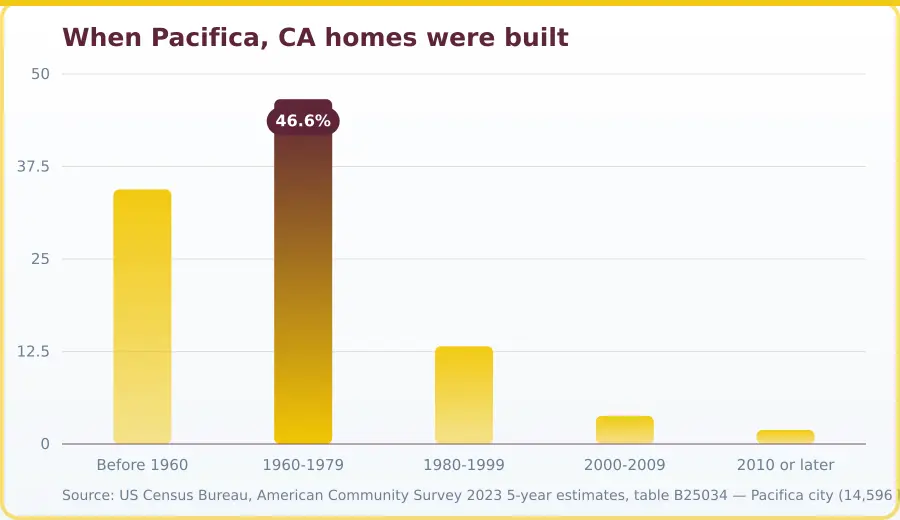
| Period | When homes were built (%) |
|---|---|
| Before 1960 | 34.4 |
| 1960-1979 | 46.6 |
| 1980-1999 | 13.2 |
| 2000-2009 | 3.8 |
| 2010 or later | 1.9 |
Source: US Census Bureau, American Community Survey 2023 5-year estimates, table B25034 — Pacifica city (14,596 housing units). Retrieved November 10, 2026.
Samsung Washer Repair FAQ — Pacifica, CA
Samsung Washer Repair addresses common issues like drum problems, water leaks, drainage failures, control board errors, and vibration or noise during cycles. A local independent provider will diagnose the fault, replace worn seals or pumps, repair electrical components, or realign internal parts as needed. The exact work depends on your machine's age and the specific malfunction.
Pacifica Appliance Experts connects you with independent Samsung Washer Repair providers in your area. Response times vary by provider availability, but many can schedule appointments within a few days. Call or submit your repair request to find out what timeframe a local provider can offer for your specific situation.
Samsung Washer Repair costs depend on the fault diagnosis, replacement parts needed, labor time, and your machine's model and age. A simple belt or hose replacement costs less than a control board or motor replacement. The independent provider you're connected with will give you an estimate after inspection so you know the cost before work begins.
Before a technician arrives, clear space around your washer and ensure it's accessible. If your Samsung is in a closet or tight laundry room, move items nearby. Turn off the water supply if there's a leak. Write down any error codes or symptoms you've noticed and have your machine's model number ready to speed up diagnosis.
Run cleaning cycles monthly, avoid overloading, use the correct detergent amount, and check hoses regularly for cracks. Wipe the rubber gasket dry after use to prevent mold and odors. In Pacifica, the coastal environment means salt air and moisture can accelerate wear—keeping your machine dry and clean between uses helps extend its life.
Winter storms and seasonal power fluctuations off the Pacific can stress appliance electronics and components. Power surges during wet weather are a recurring risk for major appliances in coastal Pacifica. If your Samsung Washer shows electrical glitches or won't start during storm season, scheduling repair quickly prevents further damage and keeps laundry on track.
More Repairs for This Brand
Homeowner Safety Toolkit
Confirm Who You're Hiring in Pacifica, CA
Before you hire anyone, use these independent national resources to confirm credentials, standards, and track record.
ISCET
NASTeC is the appliance repair industry's own national certification exam, administered by the nonprofit ISCET. It's voluntary, so it's worth asking whether your technician holds it.
About NASTeC CertificationEPA
Anyone who services a refrigerator, freezer, or other appliance containing refrigerant is legally required to hold EPA Section 608 certification. See what that actually requires.
Refrigerant Certification RulesCPSC
Check whether your specific appliance has an open safety recall before paying for a repair — some recalls cover the fix or a replacement for free.
Check for RecallsBook your Pacifica appliance repair today.
Call (650) 899-6446Our Pacifica, California Service Area
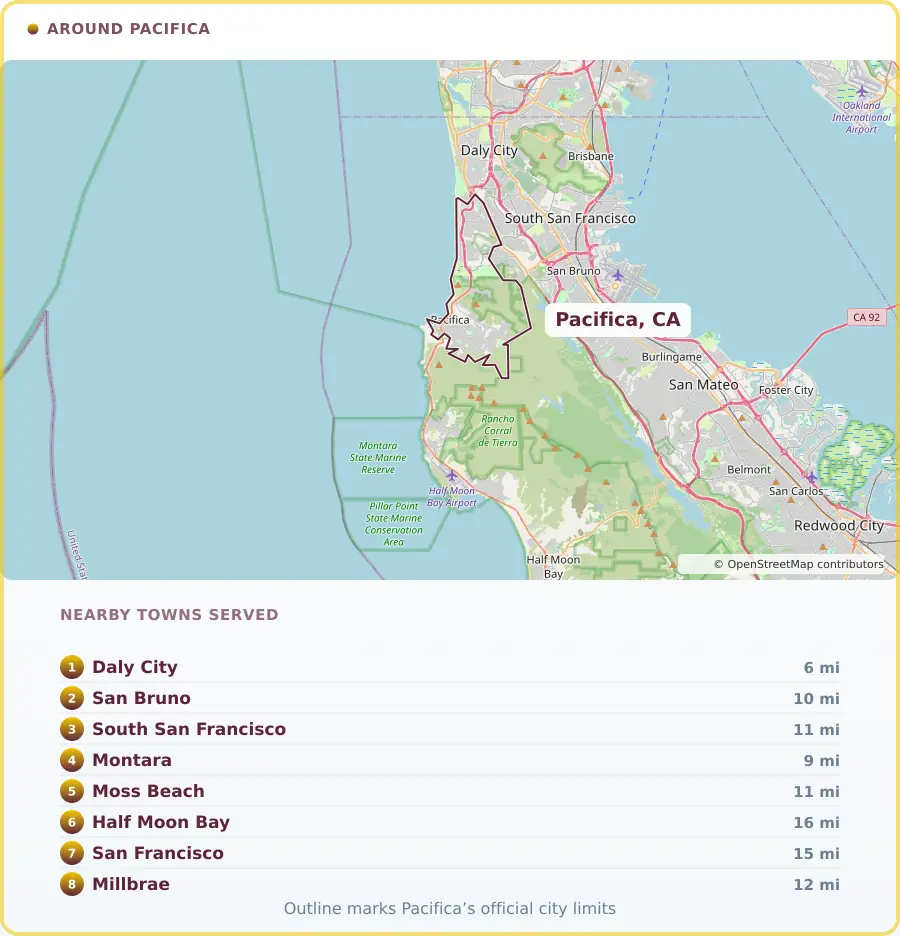
Coverage centres on Pacifica, CA and reaches 8 surrounding communities. Response time is what matters most in the hours after a problem is found, so knowing the ground is part of the job.
Pacifica, CA at a Glance
Tucked along the San Mateo County coastline, Pacifica, CA feels like a town that never quite left the beach. With roughly 37,000 residents spread across neighborhoods like Linda Mar and Rockaway Beach, daily life leans into surf breaks and fog-draped bluffs, while the pier and nearby shops keep a steady trickle of visitors coming through for a weekend away from the city.
Behind the scenery, Pacifica runs on a practical mix of tourism, retail, and everyday services. Schools, healthcare providers, and small businesses anchor the community, and a good share of residents commute north to San Francisco or south toward Silicon Valley for work. It's a place built for relaxed mornings and busy workdays elsewhere — a coastal home base where neighbors tend to know their stretch of beach and look out for one another.
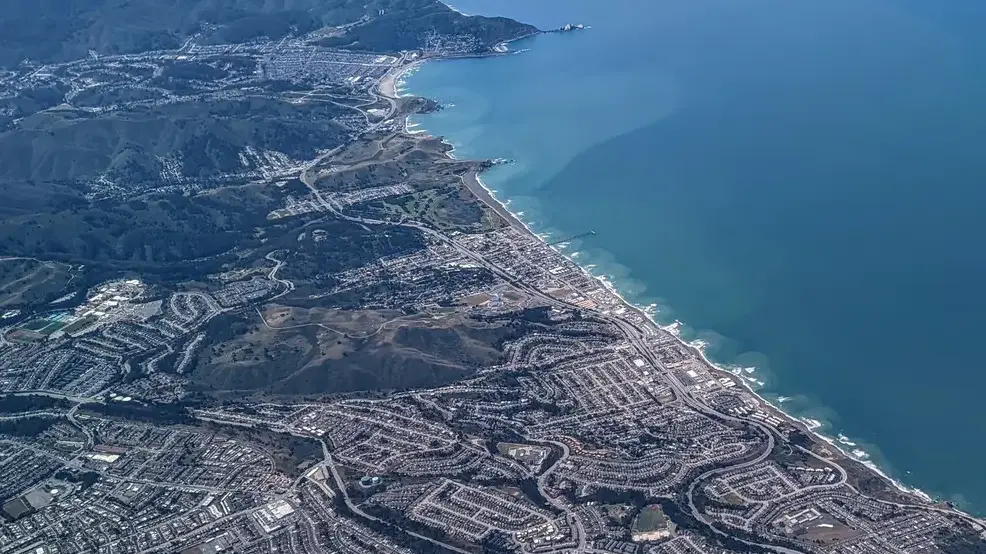
Photo: Dicklyon, CC BY-SA 4.0